API vs. SDK vs. CLI vs. MCP vs. AI Skills: A Plain-English Guide for Business Owners
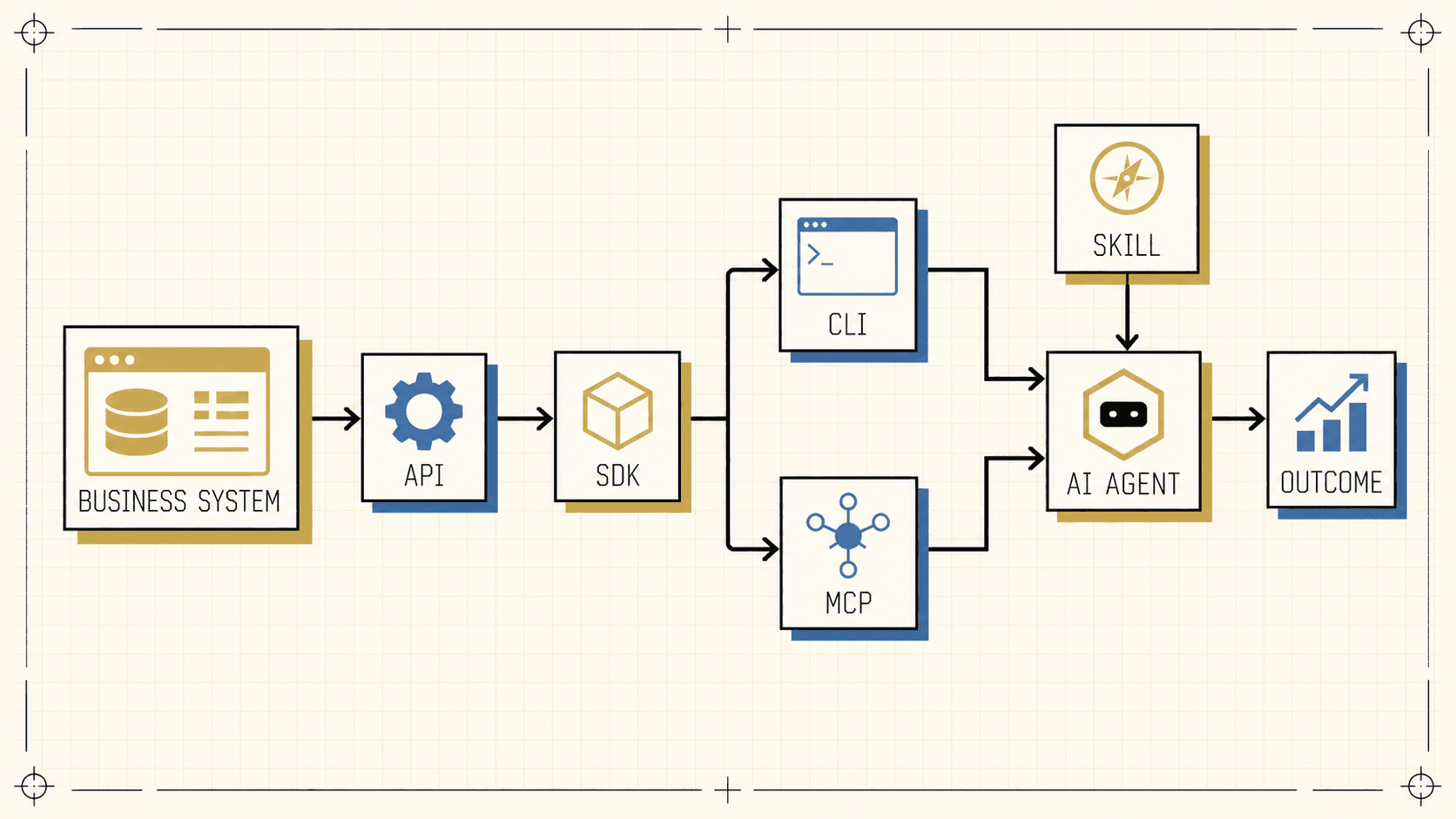
Key Takeaway: An API provides access to a system. An SDK helps a human or AI developer build software for it. A CLI turns capabilities into repeatable commands. MCP presents tools and context to compatible AI applications. A skill teaches the AI how your business wants those tools used.
As artificial intelligence connects to CRMs, email, calendars, databases, project tools, and internal files, business owners are encountering a growing list of technical terms:
API. SDK. CLI. MCP. Skill.
They are related, but they do different jobs.
Here is the short version:
- An API defines how software can interact with another system.
- An SDK helps a developer or AI coding agent build software for that system.
- A CLI turns capabilities into commands that a person or AI agent can run.
- MCP is a protocol that lets compatible AI applications discover tools and context presented by an MCP server.
- A skill teaches the AI how your business wants those tools used.
The distinction matters because connecting AI to a business application is only the beginning. A useful AI system also needs a reliable interface, appropriate permissions, clear procedures, and business judgment.
How the Pieces Fit Together
The architecture graphic above shows the conceptual flow. Business systems expose authorized data and actions through an API. An SDK can help a human developer or AI coding agent turn that access into a CLI, an MCP server, or a traditional application. A CLI and an MCP server are two different ways to present useful capabilities. A skill sits alongside those tools and tells the AI how your business wants them used. The AI agent then applies those tools and instructions to produce a business outcome.
Ownership and control change at each layer. The software vendor defines the API. A business administrator controls credentials and granted access. The SDK maintainer packages development helpers. The CLI or MCP builder decides which operations to expose. A business process owner defines the skill, standards, and guardrails. The AI host and operator control approvals. The business remains accountable for the outcome.
This is a conceptual model, not a requirement that every workflow include every component. A fixed automation may call an API directly. An AI coding agent may use a CLI without MCP. An AI application may use an MCP server that was built without an SDK. The right design depends on the job.
API vs. SDK vs. CLI vs. MCP vs. Skill at a Glance
| Component | Purpose | Who controls it | What it contains | Example |
|---|---|---|---|---|
| API | Lets software request data or actions from another system | The system vendor defines it; the business controls credentials and granted permissions | Endpoints, operations, authentication rules, data formats, and responses | A CRM API can find a contact, add a note, or create a task |
| SDK | Makes it easier to build software for a particular API or platform | Usually the vendor or an open-source maintainer; the developer chooses whether to use it | Code libraries, types, models, authentication helpers, examples, and utilities | A CRM SDK provides a ready-made function for searching contacts |
| CLI | Turns software capabilities into commands that can be run in a terminal | The CLI builder defines the commands; the user or AI harness controls when they run | Commands, options, help text, authentication checks, and text or structured output | crm contacts search --company Acme |
| MCP and MCP server | MCP standardizes the connection; the server presents tools, resources, and reusable prompts | The server builder selects what to expose; the AI administrator connects it; underlying permissions still apply | Tool definitions, schemas, resources, prompts, and connection instructions | A CRM MCP server exposes search_contacts, add_note, and create_task |
| Skill | Teaches an AI how to perform a repeatable task according to a defined process | A vendor, community, or internal team may publish it; your process owner controls a custom business skill | Instructions, workflows, standards, examples, templates, references, and sometimes scripts | A lead-qualification skill defines fit criteria, required checks, tone, and approval rules |
What Is an API?
API stands for Application Programming Interface. It is a defined way for one piece of software to communicate with another.
Instead of a person opening an application and clicking through menus, software sends a structured request. Depending on the platform, an API might let another system:
- Find a customer in a CRM
- Read a calendar event
- Create a project
- Update an order
- Export a file
- Send an email
An API acts like a contract. It defines which operations are available, what information each request requires, and what response the system will return.
The API defines what the vendor exposes through that interface. Authentication and permissions determine what a particular connection is allowed to do. One credential may provide read-only access, while another may permit records to be created, updated, or deleted.
That means “we connected the API” does not mean the connection can do everything. It means the software has a defined path to some authorized data or actions.
What Is an SDK?
SDK stands for Software Development Kit. It is a collection of tools that makes it easier to write software for a particular service, platform, or programming language.
Without an SDK, a developer may need to manually construct requests, handle authentication, interpret responses, and account for errors. An SDK often packages those details into ready-made functions and objects.
For example, instead of manually assembling a CRM request, a developer might use an SDK function that looks conceptually like this:
contacts.search(company="Acme")
In this CRM example, the SDK still communicates with the API underneath. It does not replace the API or grant additional access. It makes the API easier to use correctly in code. Other SDKs may target operating systems, devices, or platforms rather than a web API.
Official SDKs are commonly intended for application code, while CLIs are intended for command-based terminal workflows. The OpenAI libraries documentation provides a clear example of this distinction.
Can an AI Use an SDK to Build Software?
Yes. In this context, “developer” describes a role, not necessarily a human.
An AI coding agent such as Codex or Claude Code can inspect documentation, write code, run tests, and correct errors inside an AI harness. If the SDK is available and the agent has the required permissions, it can use that SDK to build:
- A traditional application
- A business automation
- A custom CLI
- An MCP server
- A data import or reporting tool
- A connection between multiple systems
For example, an AI coding agent could read a CRM SDK's documentation, install the correct package, build a command that searches contacts, test the output, and then package the command for future use.
The SDK does not give the AI intelligence or authority by itself. The AI still needs access to current documentation or code definitions, a secure method of authentication, permission to run or install software, and clear requirements for what it should build.
The SDK helps the AI build the integration. A tested CLI or MCP server can make the integration reusable. The skill teaches the AI how your business wants it used.
What Is a CLI?
CLI stands for Command Line Interface. It is a text-based way to control software by typing or running commands in a terminal.
A familiar application might provide a visual interface with buttons and menus. A CLI provides commands instead:
crm contacts search --company Acme
crm contacts read --id 12345
crm tasks create --contact 12345 --due tomorrow
CLIs are useful for both people and AI coding agents because commands are explicit, repeatable, easy to test, and easy to combine into larger workflows. A well-designed CLI can also return compact structured output, which helps an AI work with large systems without loading unnecessary information.
A CLI might call an API directly, use an SDK, query a local database, read files, or run an internal company script. It is an interface, not the underlying connection.
This is why coding agents can build custom CLIs to connect with business applications. Once the CLI exists, the agent does not need to write a fresh integration every time. It can run the tested command again. OpenAI documents this pattern in its guide to creating a CLI that Codex can use, including pairing the CLI with a skill that explains when and how to use it.
What Is MCP?
MCP stands for Model Context Protocol. It is an open standard for connecting AI applications to external tools, data, and workflows.
An MCP server can connect an AI application to:
- A company database
- Local files
- A CRM
- A calendar
- A search service
- Internal company software
- Another platform's API
- An existing CLI
According to the MCP architecture documentation, MCP servers can expose tools for actions, resources for context, and prompts for reusable interaction patterns.
The standardization is the important part. A compatible AI application can discover what an MCP server offers, understand the inputs each tool requires, and receive results in a predictable structure.
An MCP server often uses an API or SDK underneath, but it does not have to. It can also wrap a CLI, local file system, private database, or internal service.
CLI vs. MCP: What Is the Difference?
A CLI and an MCP server can expose many of the same underlying capabilities, but they present them differently.
| Question | CLI | MCP |
|---|---|---|
| Primary interface | Terminal commands | Protocol-based tools, resources, and prompts |
| Typical users | People, scripts, and AI coding agents with terminal access | Compatible AI hosts and applications |
| How capabilities are discovered | Help text, documentation, and command output | Structured schemas and protocol discovery |
| Portability | Works well anywhere the command can be installed and executed | Works across compatible MCP clients once connected |
| Good fit | Repeatable local work, scripts, file operations, compact queries, and developer workflows | AI applications that need a standardized catalog of tools and context |
Neither is automatically better.
A CLI may be the simplest choice when an AI harness already has terminal access and the work is local, highly composable, or file-heavy. MCP may be the better choice when multiple compatible AI applications need to discover and use the same tools through a standard connection.
Sometimes the strongest design uses both. A tested CLI can perform the actual work, while a thin MCP server presents selected CLI commands as structured AI tools.
What Is an AI Skill?
An AI skill is primarily about knowledge and procedure, not access.
A skill can teach an AI:
- How your company qualifies a lead
- Which facts must be checked before taking action
- How a proposal should be formatted
- Which brand voice to use
- When human approval is required
- Which sequence of tools produces the best result
- What common mistakes to avoid
- How exceptions should be handled
Skills are packaged differently across AI products. In the open Agent Skills specification, a skill is organized around an instruction file and may also include scripts, reference materials, and assets.
A skill usually does not create access by itself. It tells the AI how to use access and tools it already has.
A skill can guide behavior, but its written instructions are not a hard security boundary. Permissions, approvals, and system controls must enforce the actions the AI is not allowed to take.
A CLI or MCP server provides the tool. A skill provides the operating procedure.
Where Does the AI Harness Fit?
The AI model is the reasoning engine. The harness is the software environment around it.
Coding products such as Codex and Claude Code are examples of AI harnesses. Depending on their configuration, a harness may give the model access to files, a terminal, SDK documentation, CLIs, MCP servers, tests, approval controls, and other tools.
That surrounding environment is what allows an AI to do more than answer a question. It can inspect a project, write software, run a CLI, call an MCP tool, check the result, and continue working.
The harness also helps enforce boundaries. It can restrict file access, require approval before sensitive actions, limit network access, or prevent commands from running outside an authorized workspace.
Does MCP Replace the API, SDK, or CLI?
It depends on which layer you mean.
MCP does not replace the business system or the underlying connection needed to reach it. If an MCP server calls a vendor's API, that API remains part of the system.
An SDK is optional implementation help. A builder may use an SDK inside the MCP server, call the API directly, wrap an existing CLI, or work with local data that has no web API.
For a particular AI workflow, an MCP interface may remove the need for a separate CLI. In another workflow, the CLI may remain useful for people, scripts, file operations, or AI harnesses with terminal access. Some systems use both, with the MCP server presenting selected CLI operations as structured tools.
The practical point is that MCP standardizes how capabilities are presented to compatible AI applications. It does not automatically provide the underlying access, implementation, security, or business process knowledge.
Which Components Do You Actually Need?
Start with the job, not the acronym.
Before building anything, check whether the software vendor already provides a secure integration, automation, CLI, or MCP server that meets the need. An existing option may cost less to maintain than custom software. Build when the standard choices cannot support your workflow, controls, scale, or ownership requirements.
Use a Direct API Integration When the Workflow Is Fixed
Example: When a customer submits a form, create a contact, assign a tag, send a confirmation, and notify the sales manager.
The steps are known in advance. A direct integration may be the simplest system to operate and monitor.
Use an SDK When Someone Needs to Build Software
Example: You want a custom reporting tool that combines CRM activity with order data.
The SDK can help a human developer or AI coding agent build that software faster and with less repetitive code.
Use a CLI When the Work Should Become a Repeatable Command
Example: Search support tickets, download selected attachments, export a weekly report, or update a record after approval.
A CLI is especially useful when people, scripts, and AI coding agents all need a clear command they can test and run again.
Use MCP When an AI Application Needs a Standardized Toolbox
Example: Review a customer's history, choose whether to check billing or delivery, retrieve the right information, and recommend the next action.
MCP gives compatible AI applications a consistent way to discover and call the available tools.
The case becomes stronger when several compatible AI clients need the same capabilities. For one local coding agent with terminal access, a CLI may be simpler.
Use a Skill When the AI Must Follow Your Process
Example: Before recommending a refund, verify the order date, delivery status, previous refunds, customer tier, and approval threshold. Stop for human review above the approved limit.
That is company policy and judgment, not merely a connection.
A Real-World Example: An AI Sales Assistant
Consider an AI assistant that helps a company manage leads in its CRM.
API Layer
The CRM API provides authenticated access to contacts, activities, opportunities, and tasks.
SDK Layer
The CRM SDK gives a human developer or AI coding agent convenient functions for working with those records without manually building every request.
CLI Layer
A custom CLI turns the most useful operations into repeatable commands:
- Search contacts
- Read an opportunity
- Draft a CRM note
- Create a follow-up task
MCP Layer
An MCP server presents selected operations as structured tools an AI application can discover and use. It might call the API through the SDK, invoke the CLI, or use a combination of both.
Skill Layer
The company's sales skill tells the AI:
- How leads are qualified
- Which industries are prioritized
- Which questions must be answered before a deal moves forward
- How follow-up messages should sound
- When the AI may update the CRM
- When human approval is required
- How each interaction should be documented
The API provides access. MCP presents the capabilities. The skill contains the company’s intelligence.
That is useful business shorthand. More precisely, the custom skill encodes the process knowledge and judgment supplied by the company, while permissions and approvals enforce the hard limits.
The SDK helped build the connection into useful software. The CLI made common operations repeatable. The AI harness gave the agent a place to use those tools within configured boundaries.
Permissions and Control: Four Questions to Ask
The technology becomes easier to manage when you separate four questions.
1. What Is the Connection Authorized to Do?
A business administrator controls the credential and granted system permissions. Those permissions set the outer boundary. They may allow reading, creating, updating, or deleting records, or limit access to specific accounts and actions.
2. What Capabilities Are Exposed?
The CLI or MCP server builder chooses which commands or tools to expose, and the AI administrator chooses which connections to enable. They can present a narrower set of actions than the credential technically permits. A token may allow record updates while the AI receives only search and read tools.
3. What Rules Govern How Those Capabilities Are Used?
The business process owner defines the operating procedure. A custom skill can require validation, define approval thresholds, specify the order of operations, and explain when the AI should stop and ask a person.
4. What Can the AI Harness Execute Without Approval?
The operator and AI administrator configure which files, commands, networks, and tools the harness can access. Sensitive or irreversible actions should have stronger technical boundaries and explicit approval requirements.
These controls should reinforce one another. A written rule is not a substitute for a real permission boundary, and a limited credential is not a substitute for a clear operating procedure.
A Practical Security Checklist
Do not connect every available capability simply because you can. A safer starting point is to:
- Grant the minimum system permissions required
- Begin with read-only access when possible
- Expose only the CLI commands or MCP tools the AI needs
- Separate read, draft, and live-write operations
- Require approval for financial, destructive, or customer-facing actions
- Keep credentials out of code, prompts, logs, and skill files
- Review what information enters the AI's working context
- Use SDKs, CLIs, and MCP servers from providers you trust
- Keep an audit trail for important actions
- Test with a nonproduction account or limited dataset first
The official MCP security guidance emphasizes careful authorization, explicit consent, narrow scopes, secure token handling, and least-privilege design.
Security does not come from choosing an API, SDK, CLI, MCP server, or skill. It comes from how the complete system is designed and operated.
The Bottom Line
Most companies will use some combination of these components, not all of them in every workflow.
Connections are becoming easier to build, but none of these components automatically understands your customers, standards, approval process, exceptions, or preferred way of working. That knowledge belongs in the process you design and the custom skills you own.
The mistake is assuming that connecting AI to a tool means it is ready to operate inside the business. The connection is only the beginning. The real transformation happens when the AI receives the processes, judgment, permissions, testing, and guardrails required to use that connection well.
Build an AI System You Understand and Own
At Savino Marketing, I teach small business owners how to turn real workflows into practical AI systems they can understand, improve, and control. The goal is not to hand you another black box. It is to help you build durable capability inside your own business.
Start with one process you repeat every week. Identify the system it touches, the access it needs, the decisions it requires, and the points where a person should remain in control. That is how an AI experiment becomes an operating system you can trust.
Own Your AI is the one-on-one version of that work. Over nine weeks, we build a working AI system inside your business together, with your processes, your guardrails, and your ownership built in from the start. The application is short, and the fit call is an honest conversation about whether the program is right for you.
Own your ideas, processes, and workflows. Rent the tool.
Joseph Philip Savino is the founder of Savino Marketing, based in Hazlet, NJ. He teaches startups and small businesses to adopt AI safely. If you want a working AI system inside your business in 9 weeks, built with you so you own it, apply to Own Your AI.
Want More Insights?
Want to go deeper than the blog? Own Your AI, my 9-week 1:1 program, is where I teach this hands-on today, and The Vibe Circle, my AI community, opens in 2027.